Choosing the right video connection is essential for enjoying clear visuals, smooth performance, and reliable audio across modern electronic devices. Displayport and hdmi are two popular connectivity standards used with computers, monitors, televisions, gaming consoles, and other multimedia equipment. However, understanding the differences between Displayport to hdmi and a direct hdmi connection can help users make better purchasing decisions. Both options support high-quality digital signals, but they offer different features, compatibility, and performance benefits. Understanding displayport to hdmi vs hdmi is particularly important when connecting devices with different ports. Whether you are setting up a gaming station, office workstation, or home entertainment system, selecting the appropriate connection ensures a better overall experience.
Understanding DisplayPort and HDMI Technology
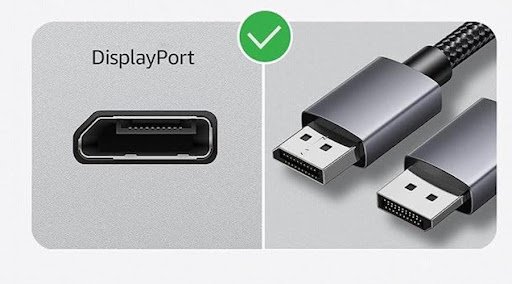
DisplayPort and HDMI transmit digital video and audio signals between compatible devices. However, they were developed with somewhat different priorities. DisplayPort is commonly found on desktop computers, graphics cards, and computer monitors, while HDMI is widely used in televisions, laptops, projectors, and gaming consoles. DisplayPort to HDMI adapters and cables allow users to connect a DisplayPort source to an HDMI display. This makes them especially useful when a computer does not have a native HDMI output. Both technologies support high-resolution displays, although actual capabilities depend on the specific version and connected hardware.
DisplayPort to HDMI vs HDMI: Key Differences
The main difference between these connections is how they establish compatibility between devices. A direct hdmi connection uses hdmi ports on both the source and display, while displayport to hdmi requires a compatible conversion cable or adapter when connecting different interfaces. A direct hdmi connection is generally simpler because it does not require an additional conversion component. However, displayport to hdmi provides flexibility when connecting computers to televisions or monitors that only support hdmi. Users should check resolution, refresh rate, audio support, and device compatibility before choosing either option.
DP Cable vs HDMI: Comparing Performance and Quality
When evaluating dp cable vs hdmi, it is important to understand that neither connection automatically guarantees better picture quality. Both transmit digital signals, so image clarity depends mainly on supported specifications and the connected devices. Displayport often provides advantages for computer-focused setups, particularly when using high-refresh-rate monitors or multiple displays. Hdmi is highly convenient for entertainment systems and gaming devices.
Important performance factors include:
Resolution: Check whether the cable supports Full HD, 4K, or higher resolutions.
Refresh Rate: Higher refresh rates provide smoother movement during gaming and video playback.
Audio Transmission: Both connections can carry digital audio alongside video.
Bandwidth: Higher bandwidth supports more demanding resolutions and refresh rates.
Choosing the right cable requires matching its specifications with the capabilities of your equipment.
Benefits of Using DisplayPort to HDMI Adapters
Displayport to hdmi adapters offer a practical solution for users who want to connect different types of devices without replacing existing equipment. They are particularly useful for connecting desktop computers to televisions, projectors, and hdmi-only monitors. Some adapters are passive, while others use active conversion technology, depending on the source device and required compatibility. Users should also consider whether the adapter supports the desired resolution, refresh rate, and audio functionality. A certified, well-made adapter can provide dependable connectivity for presentations, entertainment, and everyday computer tasks.
Choosing the Best Connection for Your Devices
Selecting between displayport and hdmi depends on how you use your devices. For example, office users may prefer DisplayPort when connecting compatible computer monitors, while home entertainment enthusiasts often choose hdmi for televisions and gaming consoles.
Consider these situations:
Gaming: Compare supported refresh rates, resolution, and variable refresh rate features.
Office Work: Choose a connection that supports your monitor’s resolution and productivity requirements.
Home Entertainment: Hdmi is usually the convenient option for televisions and media players.
Presentations: Displayport to hdmi adapters help connect laptops and desktop computers to hdmi projectors.
Always check device specifications before purchasing a cable or adapter.
Significance of DisplayPort to HDMI vs HDMI
Understanding displayport to hdmi vs hdmi is significant because the right connection can improve compatibility, simplify installation, and help users get the best performance from their equipment. Purchasing an unsuitable cable may result in limited resolution, reduced refresh rates, or no display output. Knowing the difference also prevents unnecessary spending on adapters that do not support specific device requirements. Furthermore, understanding dp cable vs hdmi helps users select accessories that match their gaming, professional, and entertainment needs. Making an informed decision ensures reliable connectivity and better long-term value.
Final Thoughts
Displayport and hdmi are both reliable technologies for transmitting digital video and audio. While direct hdmi connections offer convenience and broad compatibility with entertainment devices, Displayport to hdmi adapters provide additional flexibility for connecting computers to hdmi displays. The best choice depends on your equipment, performance requirements, and intended usage. By comparing specifications, resolution, refresh rates, and compatibility, you can select the right connection for a smooth and dependable viewing experience.
Frequently Asked Questions (FAQs)
- Is DisplayPort to HDMI better than HDMI?
Not necessarily. Both offer excellent digital connectivity, but the best option depends on device compatibility and supported specifications.
- Does DisplayPort to HDMI support audio?
Yes. Compatible DisplayPort sources and hdmi displays can transmit digital audio through a suitable adapter or cable.
- Does DisplayPort to HDMI reduce video quality?
Not necessarily. A compatible, properly functioning adapter can maintain excellent digital video quality.
- Which is better for gaming, DP cable or HDMI?
DisplayPort is popular for PC gaming monitors, while hdmi is widely used with gaming consoles. Performance depends on the supported versions and hardware.
- Can I connect a DisplayPort computer to an HDMI television?
Yes. You can use a compatible DisplayPort-to-hdmi cable or adapter to connect your computer to an hdmi television.